Pricing and billing
Anyview Cast to TV is free to download and contains ads and in-app purchases. Subscriptions are billed by Google Play, not by the developer, which matters when you want to cancel.
Last reviewed
What it actually costs
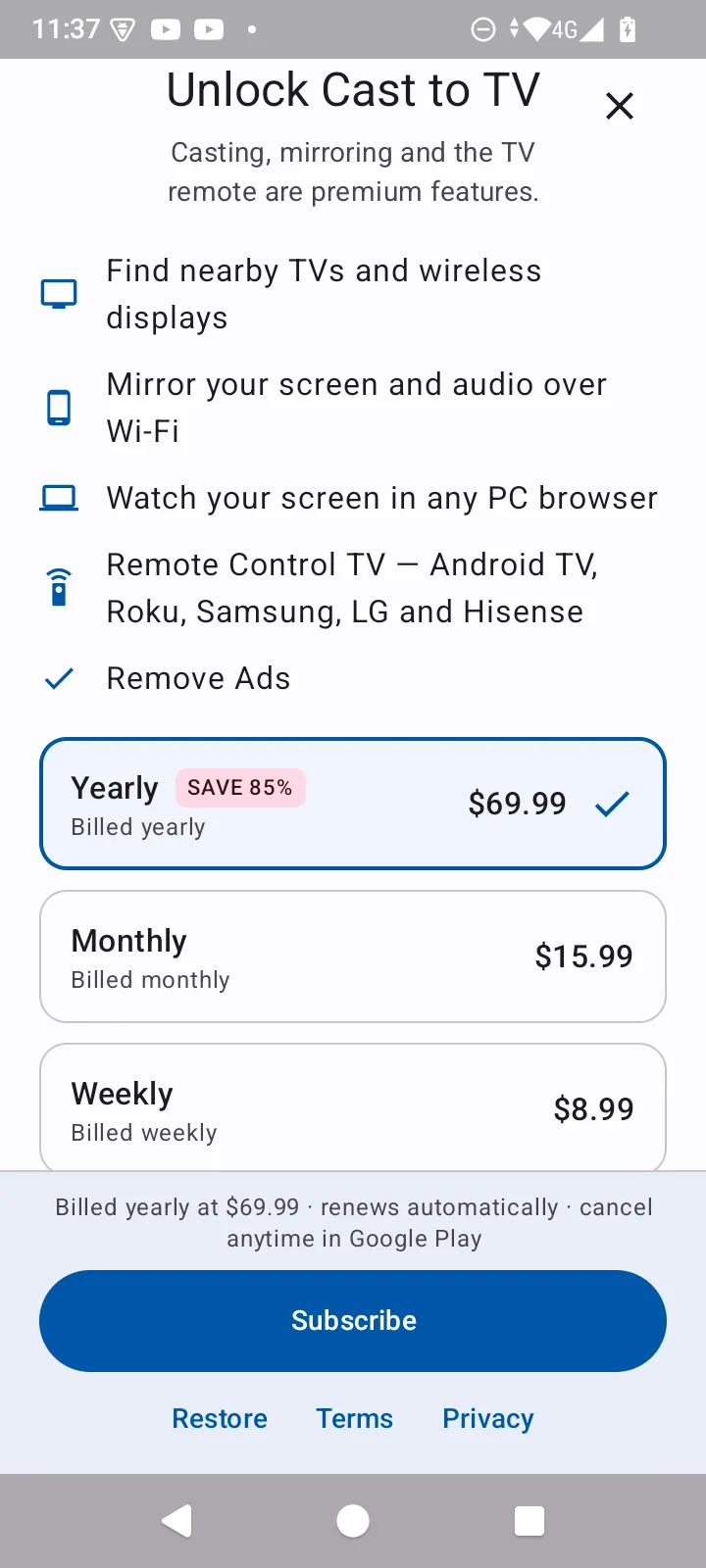
These are the plans the app offered on a real device in September 2026, photographed from its own paywall. Google charges in local currency and the offer you see can differ by country, so treat these as the US figures rather than a universal price list - but the shape of it is the part worth understanding.
| Plan | Price | Cost per year |
|---|---|---|
| Weekly | $8.99 | $467.48 |
| Monthly | $15.99 | $191.88 |
| Yearly Default | $69.99 | $69.99 |
What a subscription unlocks
The paywall is blunt about it: “Casting, mirroring and the TV remote are premium features.” Here is everything it lists as included:
- Find nearby TVs and wireless displays
- Mirror your screen and audio over Wi-Fi
- Watch your screen in any PC browser
- Remote Control TV — Android TV, Roku, Samsung, LG and Hisense
- Remove Ads
Note that finding nearby TVs appears on that list too, so we are not going to tell you the discovery step is free - the app presents it as part of what you are paying for. If all you want to know is whether your hardware can mirror at all, the compatibility checker answers that for free and without installing anything.
The free trial is three days, and that is the risky part
New users get a 3-day free trial. Three days is short, and it is the single most likely reason to end up charged for something you did not intend to keep.
The trial is tied to your Google account, not to the app or the device. Reinstalling, or installing on a second phone, will not give you another one - which is also why the paywall may show you no trial at all if you have used it before.
How to check what you are actually subscribed to
- Open the Google Play Store app
- Tap your profile picture, top right
- Tap Payments and subscriptions, then Subscriptions
- Every active subscription on that Google account is listed, with its renewal date and price
If you do not see the subscription there, you are signed in to a different Google account than the one that made the purchase. That is the most common reason people believe a cancellation failed.
Refunds
Refunds for Google Play purchases are handled by Google, not by the developer. Go to your Google Play order history, find the charge, and choose Report a problem, then Request a refund. Requests within 48 hours of the charge are usually approved automatically.
CastDone is independent of the television manufacturers and platform owners named on this site. We are not affiliated with, endorsed by, or sponsored by Hisense, Samsung, LG, Sony, TCL, Roku, Amazon, or Google. All product names and trademarks are the property of their respective owners. We do publish the Android app documented here - see the About page.
Check before you pay for anything
Mirroring is a paid feature. Confirm your phone and TV can actually do it first - that part is free.